Many overseas Pakistanis and international visitors bring their smartphones when traveling to Pakistan. However, some users are surprised when their mobile phone stops receiving signals after a few weeks. This happens because of the mobile registration rules introduced by the Pakistan Telecommunication Authority (PTA) under the DIRBS system. If a device is not registered or temporarily approved, it may stop working on Pakistani mobile networks.
The good news is that visitors can use their phones legally through PTA Temporary Mobile Registration. This guide explains the complete process, eligibility, and important rules for overseas travelers visiting Pakistan in 2026.
What is PTA Temporary Mobile Registration?
PTA allows overseas visitors to use their personal smartphones in Pakistan temporarily without paying full PTA tax. Under this facility, a mobile device can work on local networks for up to 120 days without permanent registration. Temporary registration ensures that visitors can stay connected without immediately paying the full device tax.
This system was introduced to help:
- Overseas Pakistanis visiting the country
- Foreign tourists traveling to Pakistan
- Business visitors staying for a short time
Who Can Apply for PTA Temporary Mobile Registration?
It is important to note that not everyone is eligible for temporary mobile registration under this initiative. The facility is mainly designed for international travelers. It means that you can apply if you are:
- An Overseas Pakistani visiting Pakistan
- A foreign national traveling to Pakistan
- A tourist entering the country for a limited time
Your travel record must be available in the immigration system. PTA verifies your entry into Pakistan before approving temporary registration.
Read Also: Complete PTA Mobile Registration Guide 2026 – Tax, IMEI Check & DIRBS Explained
Step-by-Step Process for PTA Temporary Mobile Registration
The temporary approval process is quite simple and can be completed online in a few simple steps.
Step 1: Check Your Phone’s IMEI Number
The first step is to find the 15-digit IMEI number of your mobile phone. It is a unique identification number assigned to every mobile device, and PTA uses it to verify and register the device on Pakistani mobile networks.
To check your IMEI number, dial *#06# from your mobile phone.
Your phone will display one or more IMEI numbers. If your phone supports dual SIM or eSIM, it may show two IMEI numbers. Carefully note down the IMEI number before starting the registration process.
Step 2: Visit the Official PTA DIRBS Portal
After getting your IMEI number, visit the official PTA DIRBS Device Registration System portal. This is the platform used for mobile device registration, verification, and temporary registration requests in Pakistan. PTA’s official temporary registration pages direct users to the DIRBS portal for online registration.
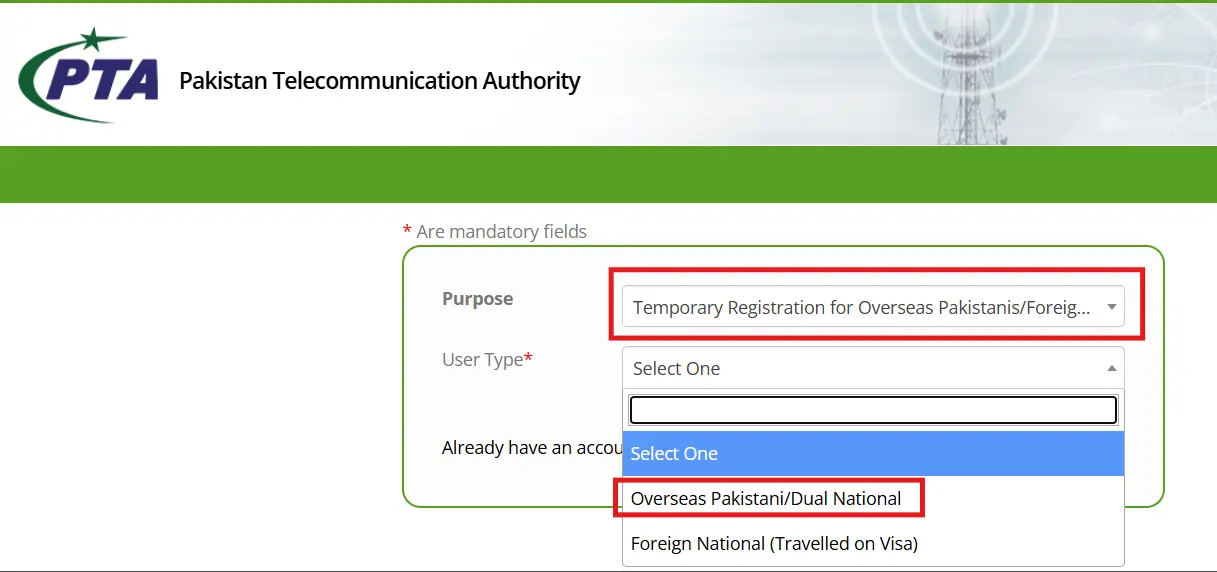
Once the portal opens, select the option related to Temporary Registration for Overseas Pakistanis / Foreign Nationals. Select the User Type from the dropdown items as “Overseas Pakistani/ Dual National” or “Foreign National (Travelled on Visa)”.
This option is specifically meant for visitors who are staying in Pakistan temporarily and do not want permanent PTA registration. Fill in the mandatory fields of the form, assign password, and click Sumbit button to register on the PTA portal.
NOTE: Read the Disclaimer carefully prior applying for Temporary Registration.
Step 3: Create or Sign In to Your DIRBS Account
If you are using the portal for the first time, create a new DIRBS account by entering your required personal details. Overseas Pakistanis and foreign nationals can sign up through the DIRBS system by providing the necessary credentials.
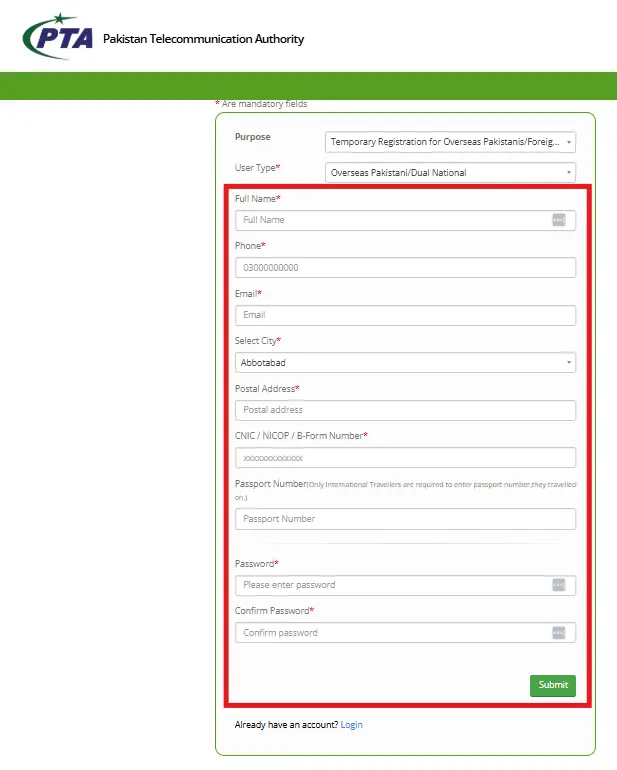
Use accurate information because PTA verifies the details against immigration and travel records. Wrong passport details, or mismatched personal information may delay or reject the registration request.
Step 4: Select Temporary Mobile Registration
After signing in, choose the temporary registration option from the available services. This option is different from permanent PTA registration because it is only for short-term visitors and is valid for a limited period.
PTA states that the temporary registration facility allows overseas Pakistanis and foreign nationals to register their personal mobile device for up to 120 days during each visit to Pakistan.
Step 5: Enter Device and Travel Information
In this step, enter your device information and travel details carefully. The system may ask for your IMEI number, passport number, arrival date, and other personal information required for verification.
Make sure all details match your travel documents. If you enter incorrect information, the system may not verify your request successfully.
Step 6: Submit the Application
After entering all required information, review the details before submission. This is important because even a small mistake in the IMEI number or passport number can create problems during verification.
Once submitted, the DIRBS system processes the request and checks whether the applicant is eligible for temporary mobile registration. PTA describes this as an online facility for temporary visitors, and the process is intended to provide mobile connectivity without going through normal permanent registration.
Step 7: Wait for Verification and Approval
After submission, PTA verifies your application through the DIRBS system. The system may check your travel record, passport details, and device IMEI status before approving the temporary registration.
If the details are correct and the request is approved, your mobile phone should become temporarily allowed for use with Pakistani SIM networks during the approved period.
Step 8: Use Your Mobile Phone in Pakistan
Once approved, you can use your device with Pakistani mobile networks such as Jazz, Zong, Ufone, or Telenor during your temporary stay. This allows you to make calls, send SMS, and use mobile data without permanent PTA tax registration for the approved period.
This facility is especially useful for overseas Pakistanis visiting family, foreign nationals on short trips, business visitors, and tourists who need temporary mobile connectivity in Pakistan.
Step 9: What Happens After 120 Days?
Temporary mobile registration is not permanent approval. After the allowed period expires, the device may stop working on Pakistani mobile networks unless it is permanently registered through the regular PTA registration process.
If you plan to stay in Pakistan for more than 120 days or want to continue using the same phone permanently, you may need to complete full PTA registration and pay the applicable duties and taxes.
Useful Tips for Visitors
Before applying, keep all important details ready so the process becomes smoother. Most registration problems happen due to wrong IMEI numbers, incorrect passport details, or mismatch between travel information and submitted data.
Visitors should also avoid unofficial agents or fake registration websites. Always use the official PTA DIRBS system because fake services can misuse personal information or charge unnecessary fees.
- Use only the official DIRBS portal.
- Apply after arrival in Pakistan.
- Keep your passport details ready.
- Double-check IMEI before submission.
- Avoid fake PTA registration agents.
- Save screenshots of your application.
- Check approval status before relying on mobile service.
Final Thoughts
PTA Temporary Mobile Registration allows overseas Pakistanis and foreign nationals to use their personal mobile phones in Pakistan for up to 120 days during each visit. The process is completed through the official DIRBS portal by entering passport, travel, and IMEI details. If the stay extends beyond the temporary period, users may need permanent PTA registration and applicable tax payment.
Before traveling to Pakistan, it is always a good idea to understand the mobile registration rules so you can avoid unexpected service interruptions.
Stay updated with Tecno Times Pakistan for the latest telecom guides, PTA updates, and smartphone registration information in Pakistan.